
Abstract
In this article we will present how to manage big and huge C++ projects, using CMake, gtest, gcov, and jenkins and others. Also we will discuss many aspects of source code management in a software development project.
Please notice that there are no “official” project templates in C++, and number of solutions that are presented in the web is huge. However we did not found many of solutions for big projects that would be good enough.
Golas:
- part 1
- fast (re)compilation
- static analysis in place
- test targets in place
- future
- code coverage measurements
- memory safety
- code profiling
- code formatting
Modularity
First thing that you may want to do in a big project is split into smaller parts. Lets call this smaller parts modules. We want modules to be small so recompilation of a module would not take more than a 60 seconds on modern laptop (like cpu with 4 cores). This will make your workflow nice. Seckond thing that we may get from modularity, is clear responsibility split. We want our modules to be like small libraries that are providing functionalities of some area, or tools that are concentrated on some area. A good example of this may be module “filesystem” (In fact this is an awful example, you should never implement file system utilities yourself.) or “shell_interface” module. One of a module will combine all modules and link them into your project executable, or library, others will compile into static libraries.
We will make our modularity by creating subfolders structure in CMake project.
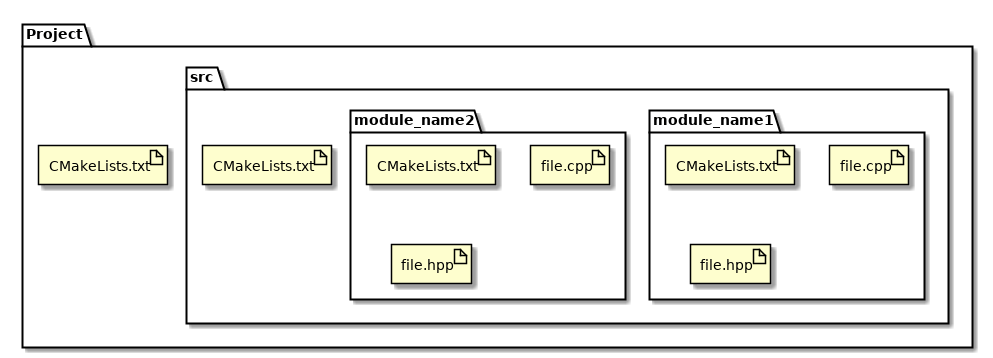
CMakeLists.txt files as follows:
project(template_cmake_project)
cmake_minimum_required(VERSION 3.0)
add_subdirectory(src)
add_subdirectory(module_name)
add_subdirectory(module_name2)
get_filename_component(MODULE_NAME ${CMAKE_CURRENT_SOURCE_DIR} NAME)
set(SRC file.cpp)

add_library(${MODULE_NAME} STATIC ${SRC})
A word about module cmake file. We do not want to insert names manually, we want to reduce this tiring process of changing names inside of project configuration so we will use a module folder name as a module name and library name. So if folder name is watchdog then module product will have name libwatchdog.a. We will use CMake get_filename_component function for that.
Sources auto indexing
Now lets add some auto indexing into our modules, because we do not want to modify sources list in when we are adding a new implementation into module. We will use aux_sourcess_dir() for this. I is ok for adding for simple indexing.
aux_source_directory(SRC ./)
add_library(${MODULE_NAME} STATIC ${SRC})
Add tests
So there are many ways to handle tests implementation, couple of naming conventions also. So in this template project we will use:
- sources for c++ implementation will use
.cppextension - headers of c++ implementation will use
.hppextension - Tests for c++ will start with
test_prefix - main function will be always implemented in a
main.cpp - We will use gtest and gmock to implement tests.
- We will keep test and with implementation, because it is easier to browse
Goal is to have libmodule.a or module executable, and test_module executable.
Indexing module sources and target sources separately
To index sources separately, we will use glob function.
file(GLOB SRC ./[^test]*.cpp)
file(GLOB TESTS ./test_*.cpp)
add_library(${MODULE_NAME} STATIC ${SRC})
target_link_libraries(test_${MODULE_NAME} gtest_main gtest pthread)
Adding gtest and gmock into project
A gtest and gmock are well known and well recognized testing and mocking frameworks from Google, they are compilable into form o libraries, so you just need to link your test executable with them. But gtest and gmock is not recommended to use as a precompiled libraries (please check google test FAQ), so we will compile it inside of our project. To keep this clean, we will make this in a cmake module googletest.cmake.
include(ExternalProject)
ExternalProject_Add(googletest
  URL https://github.com/google/googletest/archive/release-1.8.0.zip
  URL_HASH SHA1=667f873ab7a4d246062565fad32fb6d8e203ee73
  INSTALL_COMMAND ""
)

ExternalProject_Get_Property(googletest binary_dir)
ExternalProject_Get_Property(googletest source_dir)

add_library(gtest      UNKNOWN IMPORTED)
add_library(gtest_main UNKNOWN IMPORTED)
add_library(gmock      UNKNOWN IMPORTED)
add_library(gmock_main UNKNOWN IMPORTED)

set_target_properties(gtest PROPERTIES
  IMPORTED_LOCATION ${binary_dir}/googlemock/gtest/libgtest.a
)

set_target_properties(gtest_main PROPERTIES
  IMPORTED_LOCATION ${binary_dir}/googlemock/gtest/libgtest_main.a
)

set_target_properties(gmock PROPERTIES
  IMPORTED_LOCATION ${binary_dir}/googlemock/libgmock.a
)

set_target_properties(gmock_main PROPERTIES
  IMPORTED_LOCATION ${binary_dir}/googlemock/libgmock_main.a
)

include_directories(${source_dir}/googletest/include ${source_dir}/googlemock/include)

add_dependencies(gtest      googletest)
add_dependencies(gtest_main googletest)
add_dependencies(gmock      googletest)
add_dependencies(gmock_main googletest)
This will download sources and define gtest and gmock targets for our project, so we can link to them.
Cmake need to know where to find our modules so we need to add location into main cmake project file, include googletest.cmake module.
list(APPEND CMAKE_MODULE_PATH ${PROJECT_SOURCE_DIR}/cmake_modules)
include (googletest)
Adding test targets to ctest
As we want to run all test with one command, and we have multiple modules, and possibly multiple tests executables, we will use CTest to run all of them. To achieve this need to enable tests in make cmake file, and wee need to do this before adding our modules.
enable_testing()
add_subdirectory(src)
To add test to CTest in a module we will use add_test() function.
add_test(NAME ${MODULE_NAME}_tests COMMAND ${MODULE_NAME}_tests
    WORKING_DIRECTORY ${EXECUTABLE_OUTPUT_PATH})
At this point calling make test will run all test executables.
Conclusion
This is essential stuff that you need to work on your C++ project. Code for this and mode can be found at GitHub.

 Codeist - Software Consultancy and Advisory